System Architecture
Overview
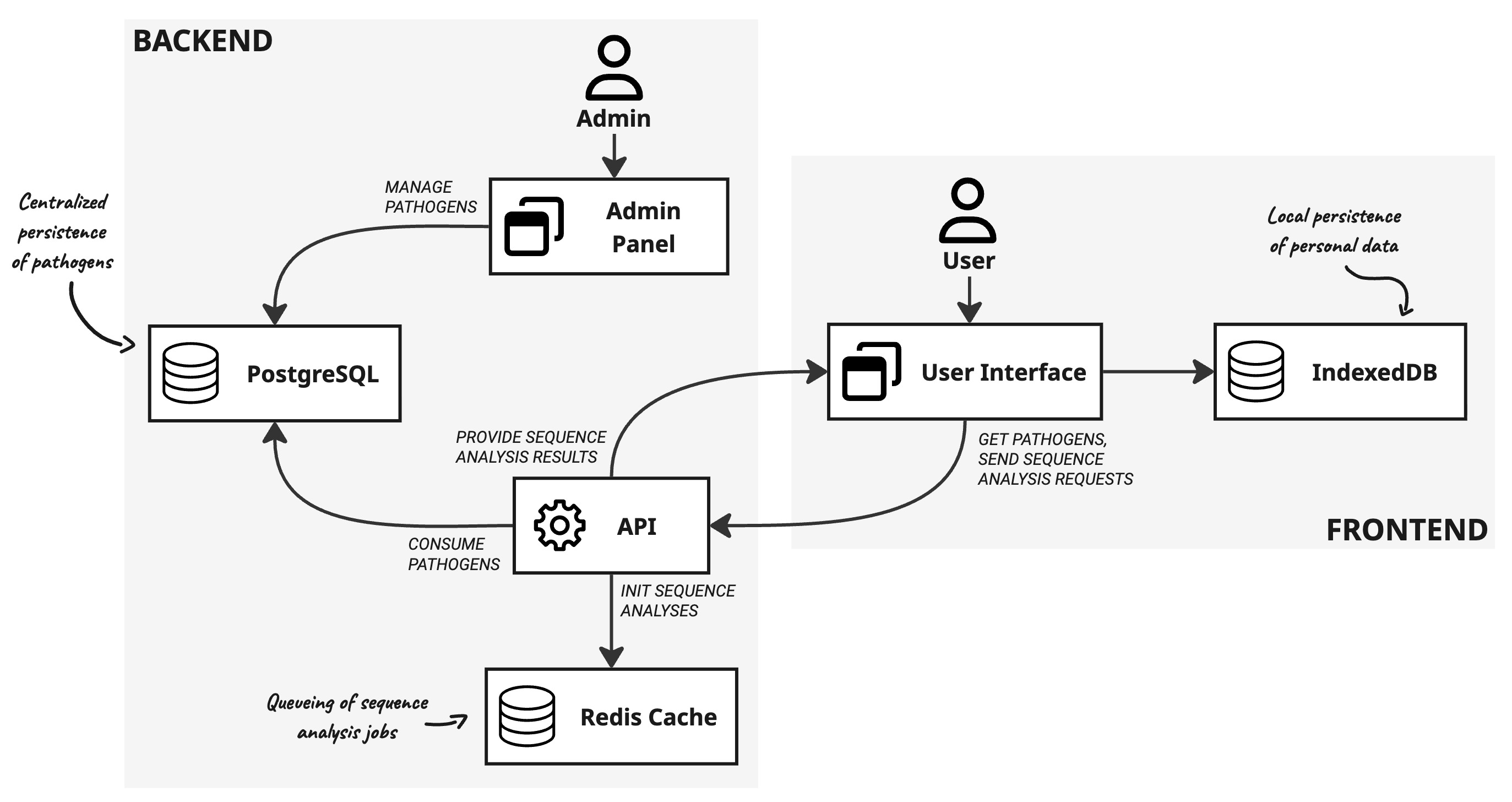
Gentrain is a browser-based web application. Below are the key components of its architecture.
Components
Frontend
User Interface
React, Zustand
Since only sequence analyses are performed on the server side, the majority of the business logic is located on the frontend. The application state at runtime is managed using the Zustand library for React. Data is persisted in a local browser database managed by IndexedDB.
The React application is divided into separate domains to create a well-structured project. These domains correspond to the application's pages.
| Domain | Description |
|---|---|
| Core | Basic functionalities like application bootstrapping, routing and browser database management. |
| Dashboard | Functionalities and components associated with the dashboard page of the application inlcuding the dashboard graph canvas, additional information charts, case information table and distance matrix. |
| Outbreak Analysis | Functionalities and components associated with the outbreak analysis module inlcuding analysis overview page, outbreak analysis graph canvas and settings panel and pdf export. |
| Data Management | Functionalities and components associated with the data management of the application including import section, cases overview table, outbreak management and automatic deletion configuration. |
| Help | Functionalities and components associated with the help page of the application. |
| Tutorial | Functionalities and components associated with the tutorial module of the application. |
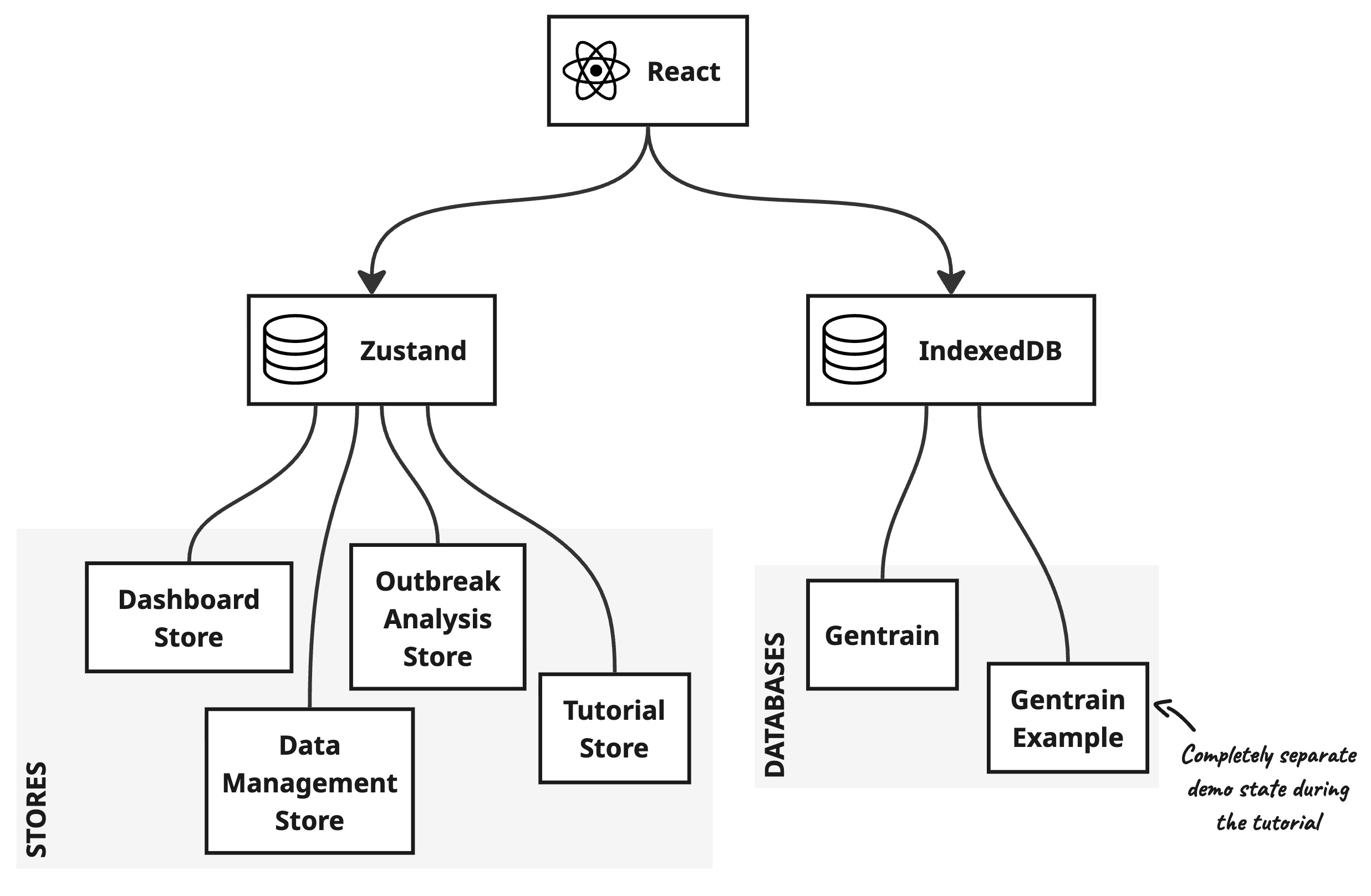
The application uses IndexedDB to manage the local browser database. As the tutorial relies on a static dataset, two IndexedDB instances have been integrated: gentrain and gentrain_example. While the latter is only active during the tutorial, the former is active during productive usage of the application. Additionally state-management solution Zustand is used for data management during runtime. Zustand orchestrates the application state within so-called stores. In GENTRAIN, these stores mirror the domains of the React application, except for the Help domain, which does not have a corresponding store. The following graph illustrates the concrete data sources of the React application.
IndexedDB
This low-level API offers powerful and efficient database functionality for client-side storage. Personal data is stored solely within the web browser's local database. As IndexedDB does not support automatic data deletion, the application provides two options: data can be deleted either after the 24-hour TTL has expired (only possible during productive usage or when the application is loaded again), or when the tab/browser is reloaded or closed (beforeunload event). The former is activated by default, but it is also possible to disable both options.
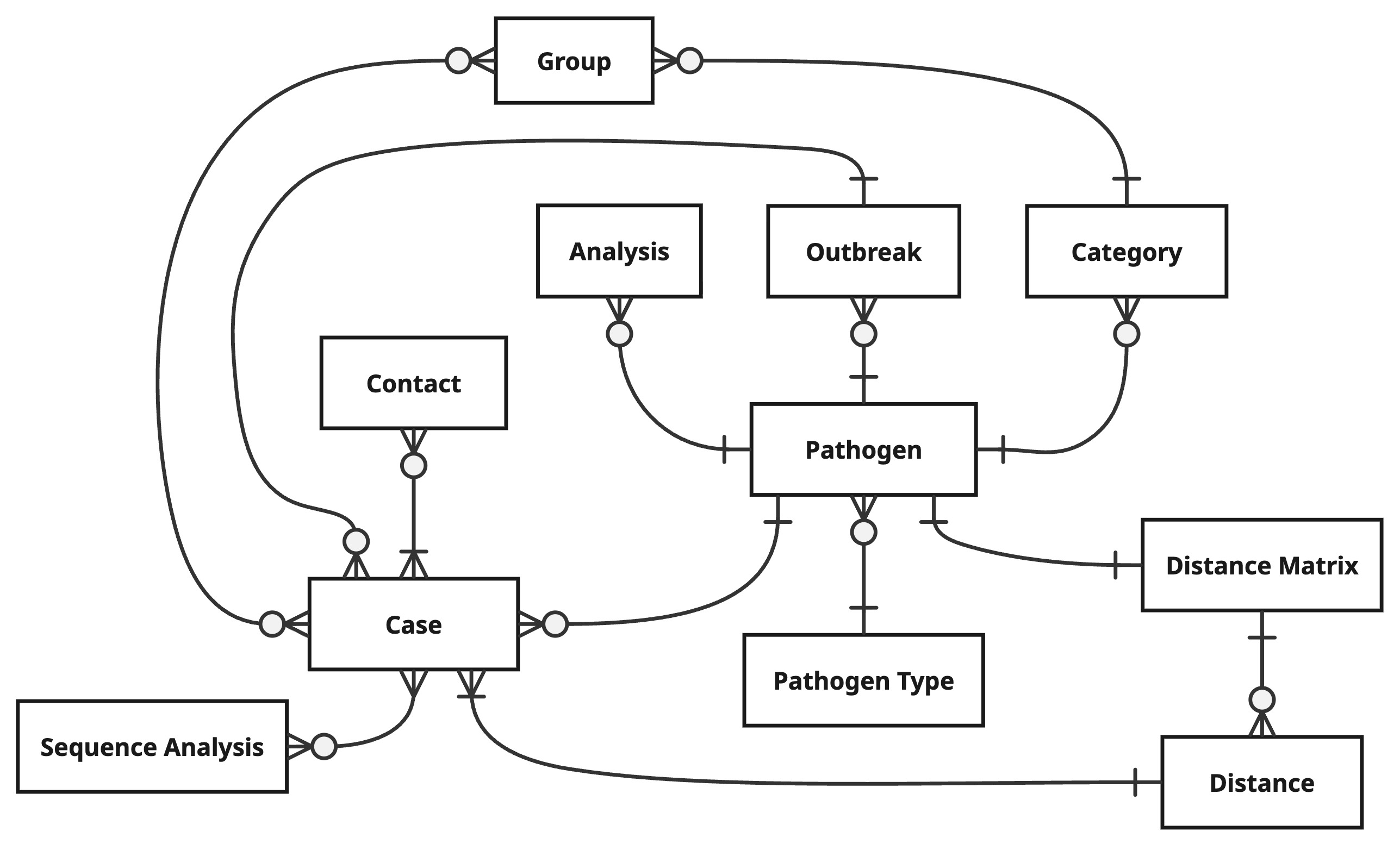
On page load, the pathogens in the client-side database are compared with the persisted pathogens in the Postgres database and synchronised. The data model of the client-side database is shown below.
Details
Pathogen
| Type | Name |
|---|---|
| int | id |
| string | name |
| int | genetic_distance_threshold |
| int | pathogen_type_id |
| boolean | activated |
| datetime | created_at |
| datetime | updated_at |
Pathogen Type
| Type | Name |
|---|---|
| int | id |
| string | name |
| datetime | initialized_at |
| datetime | created_at |
| datetime | updated_at |
Case
| Type | Name |
|---|---|
| int | id |
| string | case_id |
| string | fasta_id |
| datetime | registered_at |
| string | city |
| string | zip_code |
| string | street |
| string | last_name |
| string | first_name |
| datetime | created_at |
| datetime | updated_at |
Outbreak
| Type | Name |
|---|---|
| int | id |
| string | name |
| datetime | created_at |
| datetime | updated_at |
Category
| Type | Name |
|---|---|
| int | id |
| string | name |
| datetime | created_at |
| datetime | updated_at |
Group
| Type | Name |
|---|---|
| int | id |
| string | name |
| datetime | created_at |
| datetime | updated_at |
Sequence Analysis
| Type | Name |
|---|---|
| int | id |
| string | hash |
| object | result |
| string | schema |
| string | version |
| datetime | created_at |
| datetime | updated_at |
Distance Matrix
| Type | Name |
|---|---|
| int | id |
| datetime | created_at |
| datetime | updated_at |
Distance
| Type | Name |
|---|---|
| int | id |
| int | case_id_1 |
| int | case_id_2 |
| int | value |
| datetime | created_at |
| datetime | updated_at |
Contact
| Type | Name |
|---|---|
| int | id |
| int | case_id_1 |
| int | case_id_2 |
| string | type |
| type | context |
| datetime | created_at |
| datetime | updated_at |
Analysis
| Type | Name |
|---|---|
| int | id |
| string | name |
| object | settings |
| datetime | created_at |
| datetime | updated_at |
Backend
API
Python (Flask), Flask-SocketIO, RQ, Prisma
This API facilitates communication with the backend and primarily offers pathogen resources and file downloads, including example data and pathogen schemes. To ensure tasks are processed reliably, long-running tasks are processed within Redis queues. This means that these tasks will be processed even in high-stress situations. A WebSocket server (SocketIO) is therefore integrated into the API to facilitate bidirectional, event-driven communication during sequence analysis. Redis queues for viral and bacterial sequence analyses are orchestrated using Supervisord and can be configured in the file /backend/api/workers/supervisor.conf according to current requirements and server specifications.
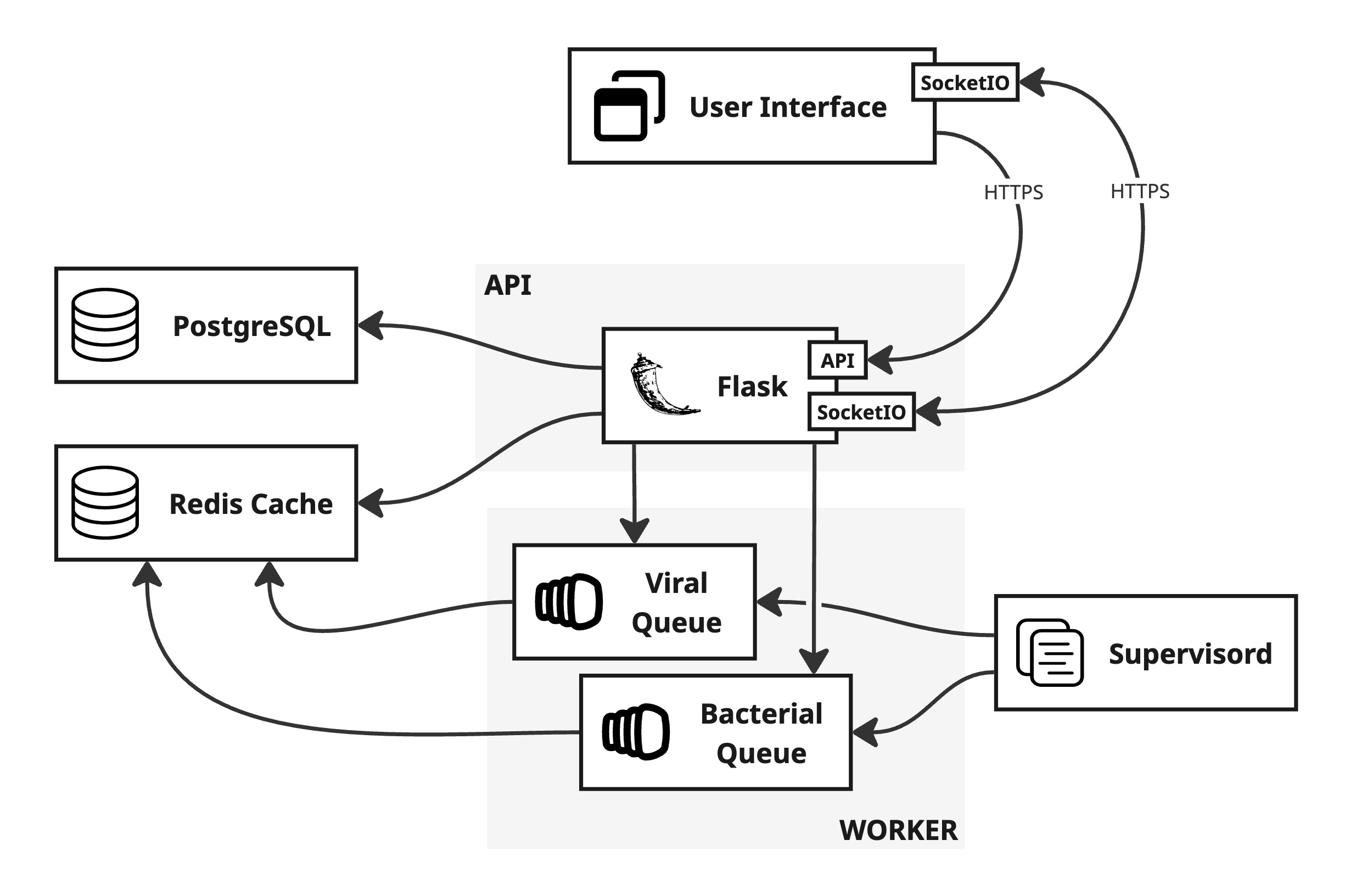
The Python application is divided into two domains, as shown in the following table.
| Domain | Description |
|---|---|
| Pathogen Registry | Operations related to pathogens. This includes retrieving information about persisted pathogens and downloading pathogen schemes and example data. |
| Sequence Analysis | Sequence analysis orchestration. This involves managing websocket events, executing sequence analysis jobs, and preparing sequence analysis responses. |
Admin Panel
NodeJS + React (AdminJS), Prisma
A user interface for managing pathogen data, particularly schemes.
Redis Cache
Long-running tasks, such as sequence analyses, are managed via Redis job queues and handled by workers. The Redis cache is also used to implement chunking of WebSocket message data by temporarily storing sequence chunks. Furthermore, sequence analyses are persisted for 30 minutes to prevent data loss if users leave the dashboard during processing.
PostgreSQL
Pathogens, admin users and roles are stored in a server-side PostgreSQL database, which can be accessed and managed via the Admin Panel.
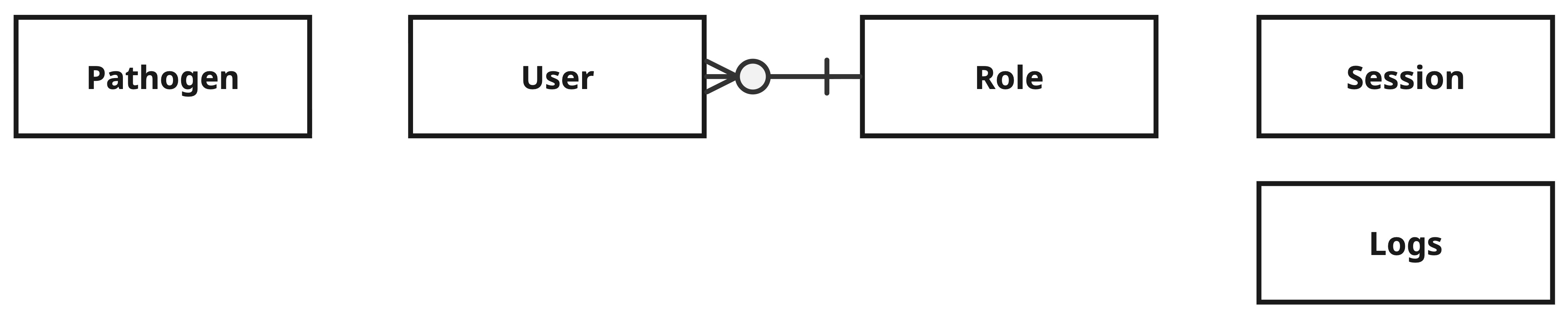
Details
Pathogen
| Type | Name |
|---|---|
| int | id |
| string | name |
| int | genetic_distance_threshold |
| int | pathogen_type_id |
| int | genetic_distance_threshold |
| int | pathogen_type_id |
| string | example_cases_key |
| string | example_cases_size |
| string | example_cases_bucket |
| string | example_sequences_key |
| string | example_sequences_size |
| string | example_sequences_bucket |
| string | example_contacts_key |
| string | example_contacts_size |
| string | example_contacts_bucket |
| datetime | created_at |
| datetime | updated_at |
User
| Type | Name |
|---|---|
| int | id |
| string | username |
| string | password |
| datetime | confirmed_at |
| datetime | created_at |
| datetime | updated_at |
| id | roleId |
Role
| Type | Name |
|---|---|
| int | id |
| string | name |
| string | description |
Logs
| Type | Name |
|---|---|
| int | id |
| int | recordId |
| string | recordTitle |
| json | difference |
| string | action |
| string | resource |
| string | userId |
| datetime | createdAt |
| datetime | updatedAt |
Session
| Type | Name |
|---|---|
| int | sid |
| json | sess |
| datetime | expire |
Docker Deployment
GENTRAIN is deployed in Docker containers. Some containers are used to deploy application components directly, while others are used to build production code or perform configuration tasks. The following graph illustrates the dependencies between the containers for a production environment. Dotted arrows indicate dependencies at system start, while solid arrows represent dependencies at runtime.
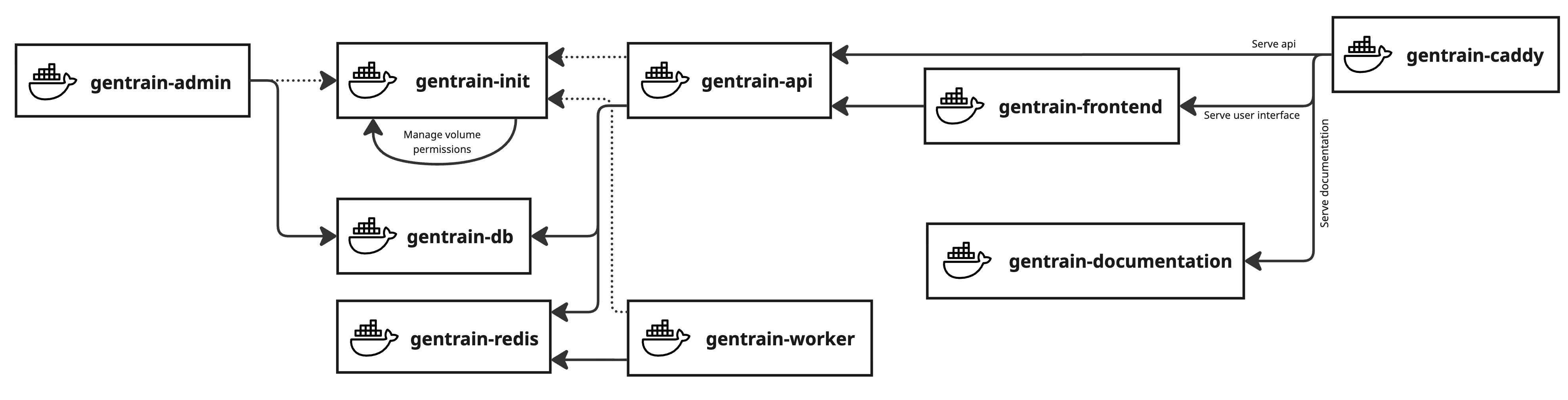
Not all containers are also used for local development, as can be seen in the table below. The table also provides descriptions of the purpose of each container.
| Container | Purpose | Used locally? |
|---|---|---|
gentrain-init | A one-time initialization container to configure volume access permissions. | |
gentrain-frontend | Builds and provides the compiled assets of the user interface for gentrain-caddy to serve. | |
gentrain-api | Runs a Flask server with API endpoints and WebSocket event handlers. | |
gentrain-worker | Executes background job workers using the same codebase as gentrain-api in Redis queues. | |
gentrain-db | Hosts a Postgres database for centralized server-side data persistence (pathogens, users, roles). | |
gentrain-redis | Provides the Redis in-memory cache used by gentrain-api and gentrain-worker to implement job queueing, as well as to persist and retrieve sequence analysis results. | |
gentrain-admin | Runs a adminJS node application to manage pathogen information and files. | |
gentrain-documentation | Builds the Docusaurus documentation for gentrain-caddy to serve as static files. | |
gentrain-caddy | Serves as the production reverse proxy and static file server for the gentrain-api, gentrain-frontend, and gentrain-documentation. |